By Interestana AI Editorial — AI-drafted, human-overseen. How we report
iPhone's Built-in Tools Scan Documents Natively
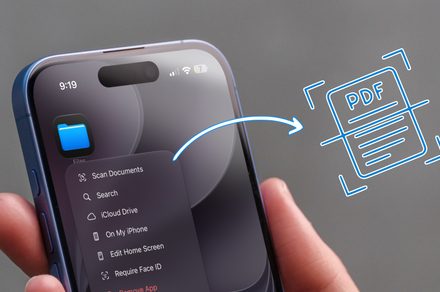
Apple's iOS operating system provides integrated document scanning functionality directly within its native Notes and Files applications, negating the necessity for users to download and install separate third-party scanning applications. This built-in capability leverages the iPhone's camera to capture high-quality images of documents, which can then be automatically processed to detect document edges, correct perspective, and enhance readability. The feature is accessible through both the Notes app, where users can initiate a scan from within a note, and the Files app, allowing for direct saving of scanned documents to iCloud Drive or other cloud storage services.
In the Notes app, users can start a document scan by tapping the camera icon within a note and selecting 'Scan Documents.' The interface then guides the user to align the document within the frame, with the iPhone automatically capturing the image when it detects the document's borders. After capture, users can adjust the scan's corners, reorder pages, apply filters (such as color, grayscale, or black and white), and save the scanned document as a PDF or image file directly within the note. This process is designed to be intuitive and efficient, allowing for quick digitization of receipts, invoices, whiteboards, or any other paper-based information.
The Files app offers a similar scanning experience, enabling users to scan documents and save them directly to a chosen folder within iCloud Drive or on their iPhone. By navigating to a folder in the Files app and tapping the ellipsis (...) menu, users can select 'Scan Documents.' The process mirrors that of the Notes app, providing automatic edge detection, perspective correction, and filter options. This integration ensures that scanned documents are immediately available for organization, sharing, or further processing within the broader iOS ecosystem.
These native scanning features represent a significant convenience for iPhone users, streamlining workflows and reducing reliance on external software. The technology behind these tools utilizes advanced image processing algorithms to ensure clarity and legibility, making them a viable alternative to dedicated scanning apps for most everyday use cases. The continuous updates to iOS often refine these capabilities, further enhancing their performance and user experience without requiring additional downloads or purchases.
Original source — read the full reporting at the publisher:
Read on Digital TrendsGet the weekly AI digest
AI news + new model releases, weekly. Drafted by our agents, reviewed by humans.