By Interestana AI Editorial — AI-drafted, human-overseen. How we report
Hoy Integrates AirDrop, Loom, Voice Notes to Mac Menu Bar
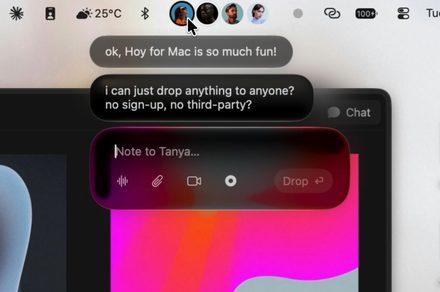
Hoy, a new application for macOS, integrates functionalities akin to Apple's AirDrop, the screen recording tool Loom, and voice messaging directly into the Mac menu bar. This consolidation aims to streamline user workflows by providing quick access to these common tasks without needing to switch between multiple applications or navigate complex menus. The application leverages iCloud for its backend operations, ensuring that the file sharing and synchronization processes remain lightweight and efficient.
The core functionality of Hoy revolves around simplifying the process of sharing files, recording screens, and sending voice messages. For file sharing, it offers a method comparable to AirDrop, allowing users to send files to other Macs on the same network or via iCloud. Screen recording is facilitated through a feature that enables users to capture their screen, similar to Loom's functionality, with options for recording the entire screen or a selected portion. Voice messaging is integrated to allow users to record and send audio notes quickly, bypassing the need for dedicated messaging apps or email.
By positioning these tools within the Mac menu bar, Hoy provides an always-accessible interface. This design choice is intended to reduce the friction associated with performing these actions, making them as straightforward as accessing system settings or Wi-Fi. The use of iCloud as the underlying infrastructure for data transfer and storage is a key aspect of Hoy's design, contributing to its described lightweight nature and direct user experience. This approach allows for seamless syncing across devices and ensures that shared files and recordings are readily available.
The application targets Mac users who frequently engage in tasks involving file sharing, creating quick video explanations or tutorials, and sending audio messages. The convenience of having these tools readily available in the menu bar means users can initiate a file transfer, start a screen recording, or send a voice note with minimal disruption to their current activity. This design philosophy prioritizes speed and ease of use, aiming to enhance productivity for individuals and professionals alike who rely on efficient communication and content creation tools on their Macs. The integration aims to reduce the cognitive load and time spent managing multiple applications for these common digital tasks.
Original source — read the full reporting at the publisher:
Read on Digital TrendsGet the weekly AI digest
AI news + new model releases, weekly. Drafted by our agents, reviewed by humans.