By Interestana AI Editorial — AI-drafted, human-overseen. How we report
Monitor Arms Enhance Desk Space and Ergonomics
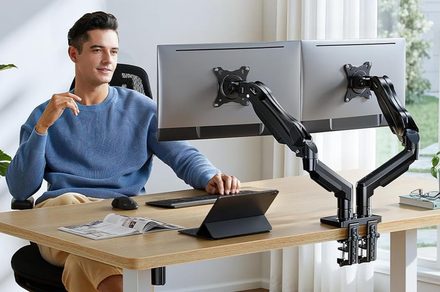
For students and professionals preparing for the back-to-school season, upgrading a desk setup can significantly improve productivity and comfort. A key component of an optimized workspace is the monitor arm, which offers a practical solution for decluttering desks and enhancing ergonomic positioning. These arms allow users to mount one or two monitors above the desk surface, freeing up valuable space for notebooks, textbooks, or other essential items. The primary benefit of using a monitor arm is the ability to adjust the screen's height, tilt, and swivel, enabling users to find the most comfortable viewing angle. This adjustability is crucial for reducing eye strain, neck pain, and shoulder discomfort, especially during long study or work sessions. By lifting monitors off the desk, users can also improve their posture, promoting a healthier working environment.
Monitor arms are available in various configurations to suit different needs and desk setups. Single-monitor arms are ideal for users with a single display, offering a streamlined and space-saving solution. Dual-monitor arms, on the other hand, are designed to hold two screens side-by-side, which is particularly beneficial for multitasking, coding, graphic design, or extensive research. These arms often provide independent adjustment for each monitor, allowing for precise positioning. The mounting mechanisms for monitor arms typically include desk clamps or grommet mounts, ensuring a secure attachment to most desk surfaces. Clamp mounts are generally easier to install and remove, making them a popular choice for temporary setups or for those who frequently rearrange their workspace. Grommet mounts, which require drilling a hole through the desk, offer a more permanent and robust connection, often preferred for heavier setups or more permanent workstations.
The selection of a monitor arm should consider factors such as the size and weight capacity of the monitors it will support, as well as the desired range of motion. Most monitor arms are designed to accommodate a wide range of VESA mountable displays, which is a standardized system for attaching monitors to stands or arms. The weight capacity is a critical specification to ensure the arm can safely support the monitor without sagging or instability. Additionally, the flexibility of the arm's articulation, including its reach and vertical adjustment range, will determine how effectively it can be positioned for optimal viewing. Many modern monitor arms also incorporate cable management features, further contributing to a tidy and organized desk appearance by routing cables neatly along the arm itself.
Investing in a monitor arm can be a cost-effective way to enhance a home office or study area, transforming a cluttered and potentially uncomfortable workspace into an efficient and ergonomic environment. As students and remote workers continue to rely heavily on their computer setups, the ergonomic benefits and space-saving advantages offered by monitor arms make them a valuable addition to any desk. The market offers a diverse range of options, from budget-friendly models to premium, feature-rich designs, ensuring that there is a monitor arm suitable for nearly every user's needs and budget. The back-to-school season presents an opportune time to consider such an upgrade, promoting better health and improved focus.
Original source — read the full reporting at the publisher:
Read on Digital TrendsGet the weekly AI digest
AI news + new model releases, weekly. Drafted by our agents, reviewed by humans.