By Interestana AI Editorial — AI-drafted, human-overseen. How we report
Adobe Premiere Finally Brings Powerful Video Editing to Android, and It's Free
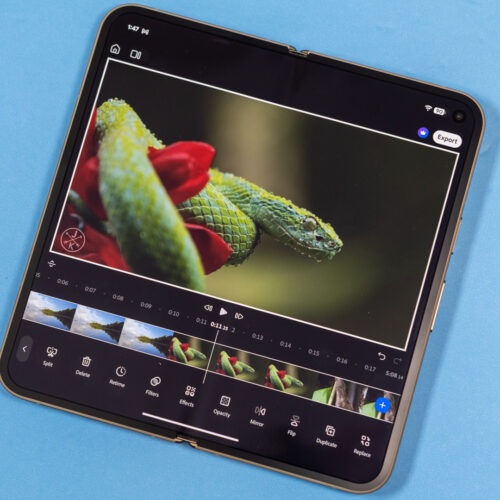
Video editing has historically been a weaker area for Android devices compared to Apple's iOS ecosystem, which has long benefited from user-friendly applications like iMovie. Google has never offered a comparable native video editing solution, leaving a notable gap in its mobile software offerings. Adobe, a long-standing leader in professional creative software, is now stepping in to address this deficiency with a dedicated Android version of its flagship video editing suite, Adobe Premiere.
The new Adobe Premiere application is now accessible on the Google Play Store, designed to be compatible with a wide array of Android devices. While the app is largely free to download and use, it's important to note that it does not replicate every single advanced feature found in the full desktop version of Adobe Premiere Pro. Nevertheless, this mobile offering represents a substantial upgrade from the soon-to-be-retired Adobe Premiere Rush, which offered more basic editing functionalities.
Users of the new Premiere app for Android gain the ability to import an unlimited number of video tracks, enabling more complex and layered video projects. Essential editing operations such as trimming clips to precise lengths and splitting them into multiple segments are fully supported. Furthermore, the application allows for the integration of various visual effects to enhance the aesthetic quality of the videos. A key feature is the capability to export finished videos in resolutions up to 4K, ensuring high-quality output suitable for various platforms. Beyond visual editing, Premiere for Android incorporates robust audio manipulation tools. These include the functionality to extract audio directly from video clips, a crucial feature for sound design and remixing. The app also offers tools to reduce distracting background noise, improving the clarity of dialogue or other desired audio elements. Additionally, users can record and add voiceovers directly within the application, streamlining the post-production process.
The application is strategically designed with a focus on the popular vertical video format, particularly for platforms like YouTube Shorts. By default, videos are set to a 16:9 portrait aspect ratio, aligning with the prevalent trend of short-form, mobile-first content consumption. However, users retain the flexibility to change this setting to more traditional widescreen aspect ratios for broader compatibility.
Adobe has placed a significant emphasis on optimizing the user interface for the diverse range of Android device form factors. On standard smartphones, the screen is typically split, with the video preview occupying the upper portion and the editing timeline situated at the bottom for easy access. For devices with foldable screens, the user interface dynamically adapts to provide a more expansive workspace. In these instances, the timeline is intelligently positioned to the right of the video preview, offering a more horizontal editing canvas. This layout is particularly advantageous when working with wider aspect ratio videos. A dedicated layout toggle is available, allowing users to switch between different interface configurations, including a view where the widescreen video is displayed above an expanded timeline. The division between the video preview and the timeline is also adjustable, empowering users to customize the screen real estate allocated to either the visual playback or the editing controls, thereby tailoring the experience to their specific workflow and the content they are editing. This thoughtful design ensures that Premiere for Android is a versatile and powerful tool for mobile video creators.
Original source — read the full reporting at the publisher:
Read on Ars TechnicaGet the weekly AI digest
AI news + new model releases, weekly. Drafted by our agents, reviewed by humans.